Ice cream shop menu board: 7 ideas
Seven ideas from a shop that runs them, with our real boards.

You already have a TV. You do not need to be good with computers to make it show your menu.
A TV menu board is a normal TV that shows your menu instead of a show. It can be a still picture like a poster, or moving pictures like a short video of a sundae. You do not need a special “signage” TV. You need five things:
Choose the TV your customers look at while they wait, usually the one behind or beside the register. Stand where the line stands and look at the wall. A window behind the screen, or a bright light above it, makes text hard to read.
Distance sets the size of your words. On a 1080p screen, which is 1920 by 1080 pixels, our prices are 54 to 66 pixels tall, about 6 percent of the screen height at the top end, and nothing is under 26 pixels. The farther back your line stands, the bigger your words should be. Do this step first. A great board in a bad spot still fails.
Turn the TV on and pick the HDMI input your player is plugged into. For a Fire TV Stick, plug the stick into a free HDMI port and plug its power cable into a wall outlet. On a TV with Fire TV built in, skip the stick. Then connect to your Wi-Fi in the Fire TV settings.
Then install the menu board app. Ours is Wow Menu Boards. It is not on the Amazon Appstore yet. That is Coming soon. Today we help every new shop install it.
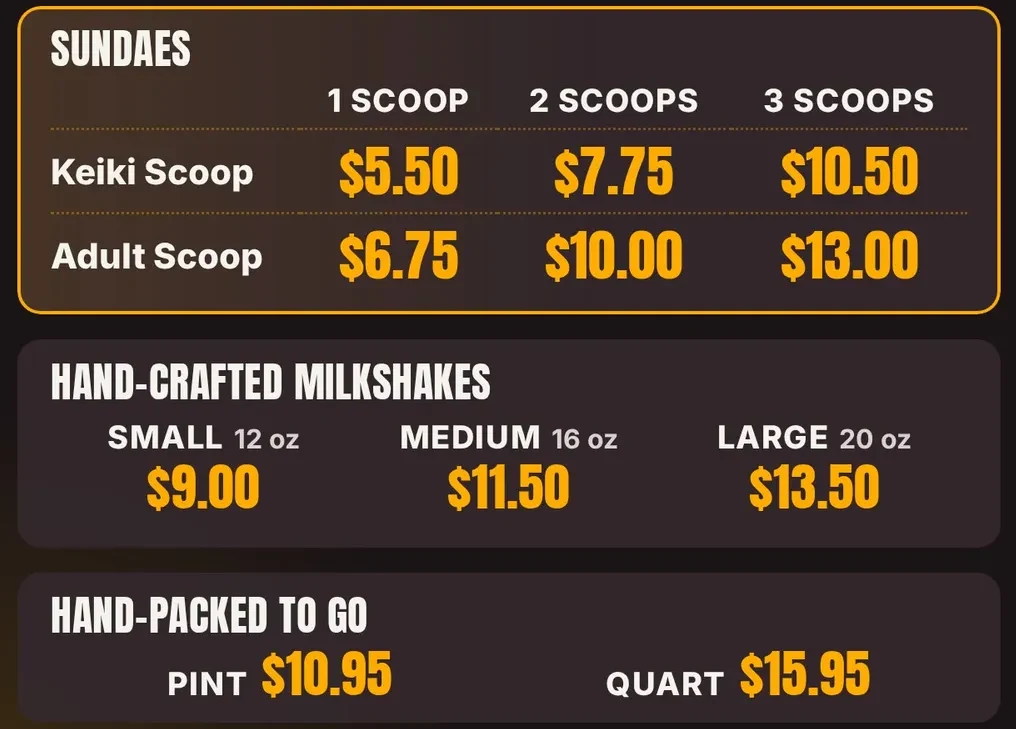
Keep it short so a customer can read it in a few seconds. Group like items together and put prices in the same spot on every line. Here is how our treats board does it: three blocks, 11 prices, each block with its own heading. Real photos of your food beat any stock picture.
Add some motion, but move one thing, not everything. On our board the sundae photo moves and the prices stay still. Today our team builds and updates boards with you. A dashboard to edit your own board is Coming soon.
A TV that stays on all night wastes power and looks sloppy. A TV that a person has to switch on will be forgotten some morning. A schedule fixes both. At closing the screen goes black. At opening your menu comes back, to the minute.
Here is the real schedule on our shop's TVs. The TV itself stays on. Only the picture changes, so nobody hunts for a remote.
| Day | Menu on | Screen black |
|---|---|---|
| Sun–Thu | 1 pm – 9 pm | After 9 pm |
| Fri–Sat | 1 pm – 10 pm | After 10 pm |
Wi-Fi goes down sometimes, usually on your busiest night. Ask any menu board company: “What does the screen show if the internet goes out?” A blank screen is the wrong answer.
Ours saves your menu on the TV, so it keeps playing. When the internet comes back, it catches up on its own. New menus and app updates arrive the same way, with no USB stick and no staff training.
Pulling prices straight from your register is Coming soon. We have not built it yet.
All 5 of our TVs at Sweet Aloha Ice Cream run Wow Menu Boards every day. Two of them are TVs with a Fire TV Stick plugged in. We followed these same five steps.
Want us to set up your first screen with you?
No. A normal TV with an HDMI port works.
Yes, to start. The catch is the daily work. Someone has to carry the stick, plug it in, and turn the TV on and off.
With Wow Menu Boards it keeps showing your saved menu and catches up when the internet is back.
Seven ideas from a shop that runs them, with our real boards.
The plain guide: what to buy and what to ask.
How the TV you own becomes a board.
Per screen, month to month.
We open free trials a few shops at a time, and we set up your first screen with you.
14 days free, no cardNo contract. Cancel anytime.