Show your menu with motion
Moving pictures catch the eye. A short video of your top dish sits next to prices.

A digital menu board is a screen that shows your menu. Here is what you need, what to ask, and what to skip.
It is a TV on your wall that shows your menu as pictures and video. Customers read it while they wait. When something changes, you change the screen. You do not reprint a sign.
You may also hear “electronic menu board” or “digital menu.” For a counter or a restaurant wall these usually mean the same thing. If you were thinking of a menu on a customer's phone or a tablet at the table, read our page on the electronic menu.
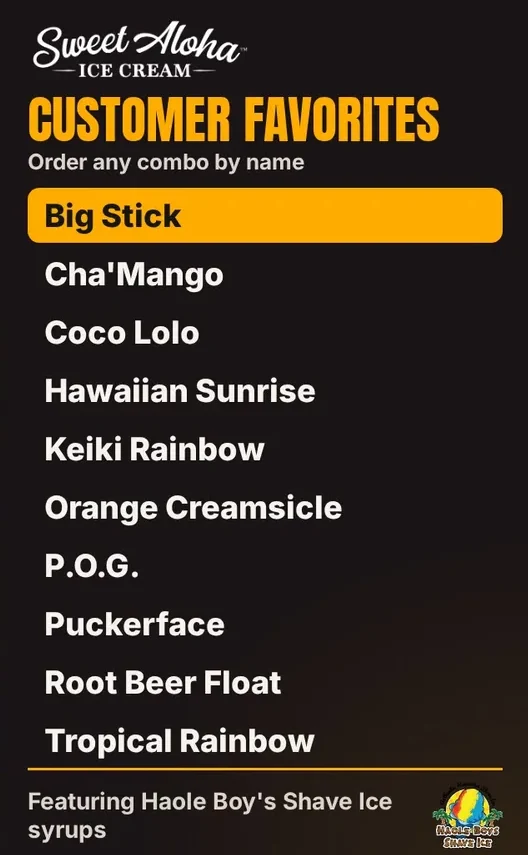
We only list things we can show you today.
Moving pictures catch the eye. A short video of your top dish sits next to prices.
The screen goes black at closing and comes back at opening. No remote.
If Wi-Fi drops, the board keeps showing your menu.
Menu sync from your register is Coming soon, Clover first.
A normal TV with an HDMI port. You do not need a special signage screen. If you already have a TV over the counter, you probably own this part. Size depends on your room: the farther back your line stands, the bigger the screen or the bigger your words.
Fire TV built in, or a Fire TV Stick. This is the small computer that runs the app. Three of our five TVs have it built in. The other two use sticks plugged into the HDMI port. A stick needs power, so check there is an outlet near the TV.
The app that shows your menu and follows your hours. That is Wow Menu Boards. It plays your pictures and videos full screen, goes black at closing, and updates itself. Today our team builds your boards with you.
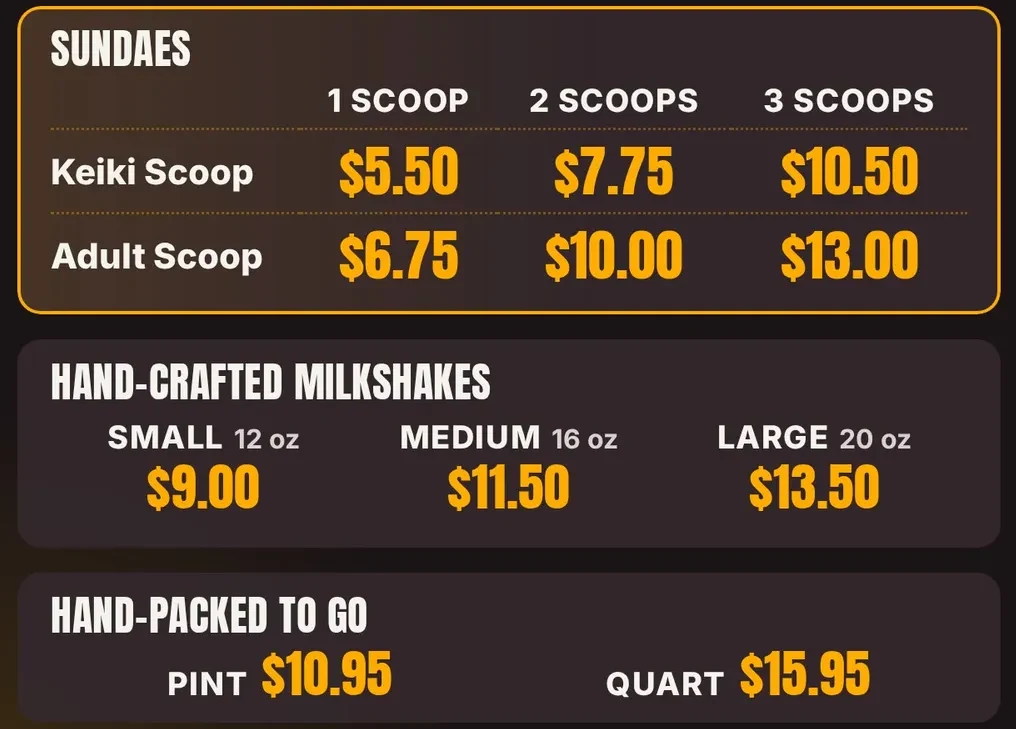
Your items, your prices, and photos of your real food. A grid like the one below is a good start: sizes across the top, items down the side, prices big and in one column.
Menu board software is usually priced per screen, per month. Ours is month to month, with no contract. Our founding Basic plan is $12 per screen per month, and everything in it works today. For example, 5 screens at the Basic price is $60 a month.
Add your TV and a Fire TV player if you do not have one. See our pricing page for the full list, including plans that open later. We will tell you straight if you already own what you need.
Ask for it in writing, per month, with the billing term. Then ask what is not in it. Some companies charge extra per feature, for a player, or for each extra screen. Write each answer next to the others on one sheet. Side by side, the differences show up fast.
A player, a TV, a cable. Get the full list. Ask if the player is a box the company sells you or a stick you can buy anywhere. If you already own a TV with Fire TV built in, you may need to buy nothing. We will check what you own before you spend a dollar.
You, or the company? How long does a change take? Today, with us, you send the change by text or the contact form and we update the board. A dashboard so you can do it yourself is Coming soon. Whatever a company says, ask for a real example: how long did the last price change take?
Ask what is live today and what is promised later. A register connection that is “on the roadmap” is not a feature yet. Ours is Coming soon, Clover first. Until then your board runs next to any register. Read more on our Clover menu board page.
Does the screen keep playing? On a busy Friday night, a blank screen is a bad answer. Ours keeps your last menu on the TV and catches up when the internet comes back.
Is it month to month? Do I keep my photos and menus? Ours is month to month. If you cancel, ask us and we will send you copies of your board and photos.
All 5 of our TVs at Sweet Aloha Ice Cream run Wow Menu Boards every day. That is one shop, our own, and it is how we know what a busy counter needs from a screen.
Want to see how it would look for your menu?
Yes. Pricing is per screen, month to month. We run 5 TVs in our own shop.
With us today, you send the change by text or the contact form and we update your board. A dashboard to do it yourself is Coming soon.
Not yet. Clover sync is Coming soon, then Square and Toast. Your board works next to any register today.
Three kinds of electronic menu and which one fits a shop.
Seven ideas from a shop that runs them, with our real boards.
Five steps, with examples from our shop.
How the TV you own becomes a board.
We run Wow Menu Boards every day on 5 TVs at Sweet Aloha Ice Cream. We would like to set up your first screen with you.
14 days free, no cardNo contract. Cancel anytime.