
Getting started
Pair a TV with your account
Type the code from your TV. That is the whole step.
What you need
- A Fire TV, or a TV with Fire TV built in.
- The Wow Menu Boards app on it. How to install it
- Wi-Fi or a network cable.
Steps
- Turn on the TV and open Wow Menu Boards.
- The TV shows a code, like K7P-4MX.
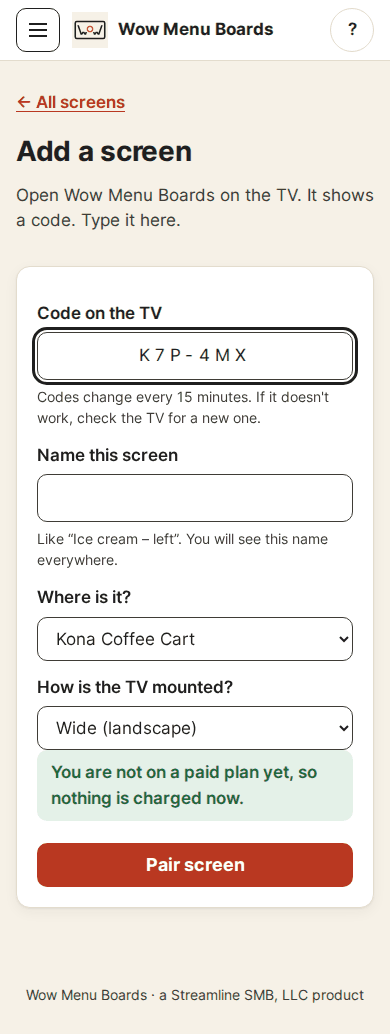
- In the dashboard, tap Screens, then Add a screen (or Add my first screen).
- Type the code.
- Give the screen a name, like "Ice cream - left". Pick the place it is in. Say if the TV is wide or tall.
- Tap Pair screen. The TV changes in a few seconds.
Which screen is this TV?
Did you set up screens before you had the TVs? Then you may see a list called Which screen is this TV? Tap the screen this TV should be. The TV plays that screen's playlist and hours right away. Tap A new screen if it is a brand new one.
If the code does not work
- Codes change every 15 minutes. Look at the TV for a new one.
- Check the letters on the TV again.
- The TV needs the internet for this first step.
- No code on the TV? Check that the TV is on and the app is open.
Pair again later
Open the screen in the dashboard and scroll to Remove this TV and tap Unpair this TV. The TV goes back to its code screen. You can pair it again any time.
Coming soon: installing the app from the Amazon Appstore. Our listing is in review. Today you install it by hand. See how
Still stuck?
A real person answers. We usually reply within one business day.