How to update a digital menu board
Keep prices right without the stress.

The price on a website is only the first number. Here are the four costs to count, with the real numbers from our own shop.
You pay for four things when you put a menu on a TV: software, a player, design time, and the time it takes to make changes. Most shops only look at the first one. The other three decide what you really spend.
We run Sweet Aloha Ice Cream in Davie, Florida. All 5 of our TVs play a Wow Menu Boards menu every day, so these are costs we know from our own counter. Below, each cost gets its own part. We compare cost types, not company names, so you can use this list with any company you talk to.
Our own prices are on the pricing page. They are founding prices for our first shops, and they can change before launch.
Software is the part that shows your menu and keeps it on schedule. Most companies charge per screen, per month, so two TVs cost twice as much as one. Ask what the first plan leaves out. A cheap first plan can hide the features you want, like a link to your register.
Our Basic plan is $12 per screen, per month. It has full-HD motion video, an exact on and off schedule, play when the internet drops, self-updates, and setup and menu changes by our team. Three screens on Basic is 3 × $12 = $36 a month. Five screens is $60 a month. Standard ($19) and Pro ($29) open when Clover sync ships. That is Coming soon, so we do not charge for it yet.
A TV needs a small player to get your menu from the internet. Some TVs have one built in. Others need a stick that plugs into an HDMI port on the back. Count this cost once for each TV, at the start, not every month.
Our setup has no big box to buy. Three of our TVs have Fire TV built in, so they cost nothing extra. Two use Fire TV Sticks. A stick is a one-time purchase, and the price changes by store and by sale, so check the store for today's number before you plan. Our media player guide shows how to pick.
Someone has to make the board. That might be you in a free design tool. It might be a designer you pay by the hour. It might be the software company. Always ask who does it and what it costs, because some companies charge for this and some do not.
With us, setup is on the plan. Our team builds your first board from your menu and real photos of your food. Our rule of thumb for a first board: plan for an afternoon to collect your items, prices and photos, then a day or two to see a first version. A board with three blocks and about ten prices is a good first target.
This is the cost people forget. A printed board costs money every time a price changes: the print fee, the trip to pick it up, and the day the old board hangs there while you wait. Add it up for one year. Take the number of changes, times the cost of one reprint, times the number of boards.
On a screen, a change is a short message. At Sweet Aloha we change flavors and holiday boards often, and nobody reprints anything. Today you send us the change by text or by the contact form, and we update your board. A dashboard to do it yourself is Coming soon.
Here is how the four costs look in our own shop. The software number comes from our pricing page. The rest is what we did.
| Cost | At Sweet Aloha |
|---|---|
| Software | 5 screens × $12 on Basic = $60 a month |
| Player | 3 TVs with Fire TV built in, 2 with a Fire TV Stick |
| Design | Boards built by our team from our menu and real photos |
| Changes | We send a message, the board updates. No reprinting |
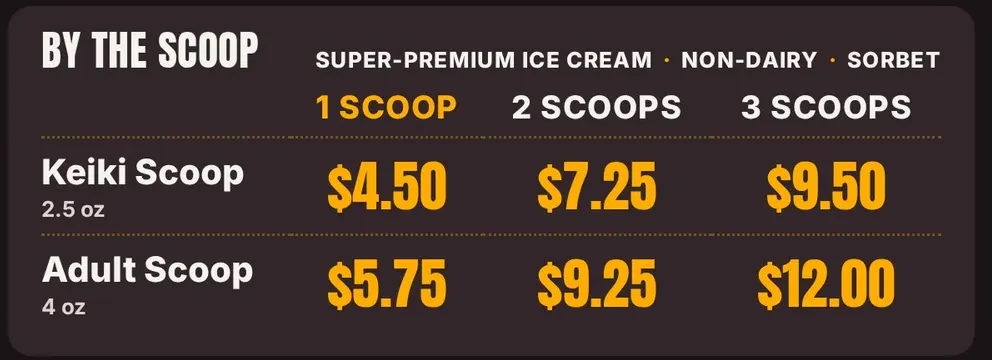
The price grid below is one of those boards. It holds six prices, one time, for every flavor we sell. Fewer, bigger numbers also mean fewer changes later.
Want your first screen set up with you? Try it free for 14 days, no card.
You can make a menu picture in a free design tool and play it on a TV from a USB stick. That costs only your time. The catch is the daily work. Someone has to carry the stick, plug it in, turn the TV on and off, and redo the picture every time a price changes.
A paid service mostly buys you out of that work. If a free plan is limited to a few screens or a few features, read what is left out before you count on it. Free is a fine way to try the idea on one TV. Just add up the minutes you spend each week, and put a price on your own time.
Write the answers in one table, one column for each company. After that, the best choice is usually clear. For us, the answers are: $12 per screen on Basic, no box to buy, setup by our team, changes by message today, the menu keeps playing offline, and month to month with no contract.
We do not try to be the cheapest. We try to be the one that does not let you down: smooth video, screens that turn on and off with your hours, and people who answer when you need help. We charge for a feature only once it works. Standard and Pro open when Clover sync ships, and not before.
Keep prices right without the stress.
What the little box does and what to buy.
Five steps, with examples from our shop.
Per screen, month to month.
Four kinds of board, and three questions that pick one.
Which kind of tool fits a small shop.
We open free trials a few shops at a time, and we set up your first screen with you.
14 days free, no cardNo contract. Cancel anytime.