Menu board design tips
Six plain rules for a board people can read fast.

A pizza counter needs a board that sells combos and takes price changes without a reprint. Here is a simple plan.
A pizza board has one job: help a hungry person pick fast. Most people at a pizza counter want the same few things, a slice, a whole pie, a combo and a drink. So lead with those. Put the combo in the biggest block, because a combo raises the order size and is the easiest thing to explain in one line.
Here is a simple layout for a 1920 by 1080 screen. Left block: “Slice + Drink,” one price. Middle block: whole pies in three sizes, with the price under each size. Right block: “Family Night,” for example one large pie, ten wings and a two-liter drink for one price. Keep it to about three blocks and no more than twelve prices. Use letters at least 48 pixels tall for names and 64 for prices, so a person can read them from the back of the line.
New owners often list every topping with a price. That makes a wall of small words. Try this instead: show one line, “Any topping: +$1.50,” then show photos of your three top pies. Customers choose faster when they see a few clear choices than when they see forty.
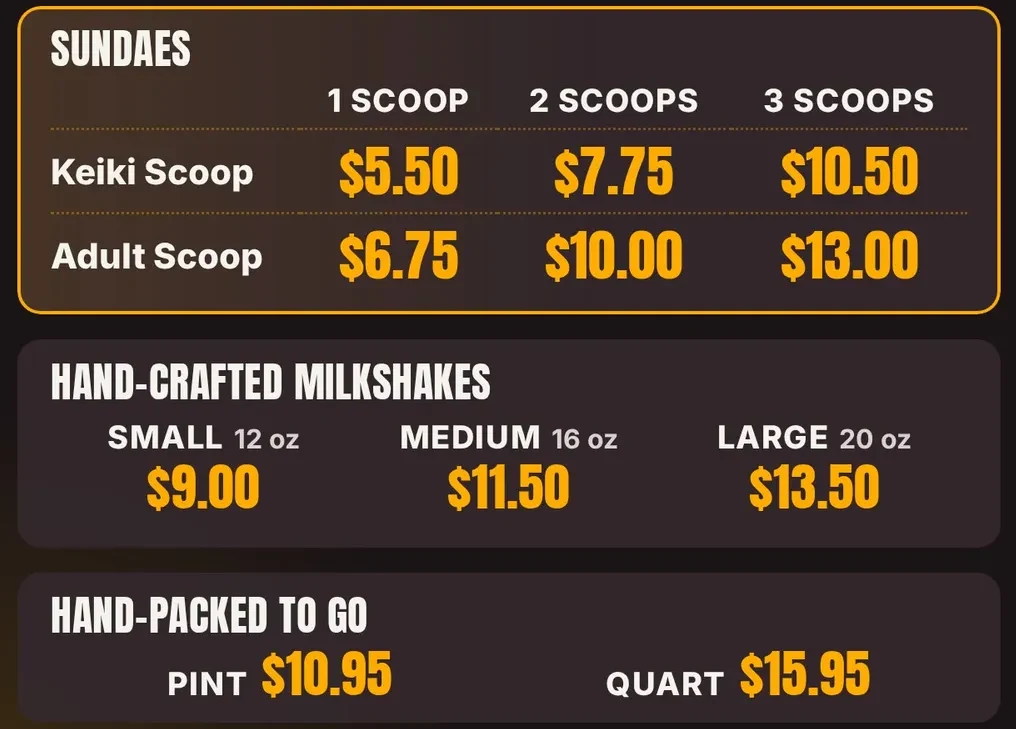
We learned this at our ice cream shop. Our board for treats has three price blocks, each with a photo, and nothing else. A pizza board can work the same way. One block for slices, one for pies, one for combos.
Want a board like this for your pizza counter? We set up your first screen with you. Try it free for 14 days, no card.
Pizza prices move. Cheese goes up. Wing prices jump when a supplier raises the price of a case. If your menu is printed, each change means a new print, or a sticker over the old number, and a board that looks messy by the end of the month.
Picture a Tuesday. Your wing price goes from $11 to $12. With a printed board you wait for a reprint, or you cross out the old price. With a screen board you send us the change, and we update the number on your screens. Today you send the change by text or by our contact form, and our team does the update. A dashboard where you edit it yourself is Coming soon.
One habit helps a lot: keep every price in one place on the board, and keep each price in the same spot every time. Then a change touches one number, not the whole design.
Where you hang the screen matters as much as what is on it. At a pizza counter, people stand in two places: in line, and at the pickup spot. The main menu belongs where the line faces, above the register, at a height you can read without tilting your head. Hang it high enough that people in the back of the line can see it over the heads in front, and tilt it down slightly if the wall allows.
Pizza ovens give off heat and steam. Do not put a TV close to an oven or a fryer. Keep it a few feet away and let air move behind it. A second, smaller screen near pickup can show specials or “order ready” items, but start with one. We run five TVs at our shop, and each one hangs where the customer is already looking. A bright window behind the line can hide small letters, so check the board at noon and at dinner.
Many owners ask, “Will the board match my register?” A link between your register and your board would keep prices in sync, so you type a price once. We are building that for Clover first. It is Coming soon, and we do not call it live. Today the board and the register are two lists, so when a price changes, change both.
What is live now: full-HD motion video, exact on and off times, play when the internet drops, self-updates, and setup and changes by our team. Our Basic plan is $12 per screen, per month, and Standard ($19) and Pro ($29) open when Clover sync ships. See all features with Live and Coming soon marked, learn the basics in how to turn a TV into a menu board, or compare costs in digital menu board cost.
We have not set up a screen inside a pizza shop yet. Our five screens run in an ice cream shop in Davie, Florida, and this advice comes from there. If you run a pizza counter, tell us what you need and we will say plainly if it fits.
Six plain rules for a board people can read fast.
Keep prices right without the stress.
What small shops really pay, in plain parts.
Five steps, with examples from our shop.
We open free trials a few shops at a time, and we set up your first screen with you.
14 days free, no cardNo contract. Cancel anytime.